Introduction
One of the most exciting developments in cloud-native computing is the integration of WebAssembly with Kubernetes. While Kubernetes was designed with containers in mind, its modular architecture allows it to orchestrate alternative workloads—including WebAssembly.
This comprehensive guide explores two distinct approaches to running Wasm workloads on Kubernetes, each with unique advantages and trade-offs. The choice between them depends on your specific requirements, existing infrastructure, and operational preferences.
The Problem: Orchestrating Wasm in Kubernetes
Kubernetes natively supports Linux containers through the Container Runtime Interface (CRI). But how do we run Wasm workloads alongside or instead of traditional containers?
The answer lies in Kubernetes’ modular design: two different the answer lies in Kubernetes’ modularity:
- Different container runtimes can be swapped (CRI-O, containerd, etc.)
- Low-level runtimes can be customized or replaced
- New handler types can be registered
This flexibility enabled the development of two distinct approaches to Wasm integration.
Overall Kubernetes Integration Architecture
Before diving into the two methods, understand how Wasm integrates with the Kubernetes stack. At a high level, Kubernetes orchestrates workloads through multiple runtime layers, each with specific responsibilities for managing containers or WebAssembly modules.
The two methods differ primarily in how the Wasm runtime is invoked and which components are involved.
Hybrid Cluster Architecture
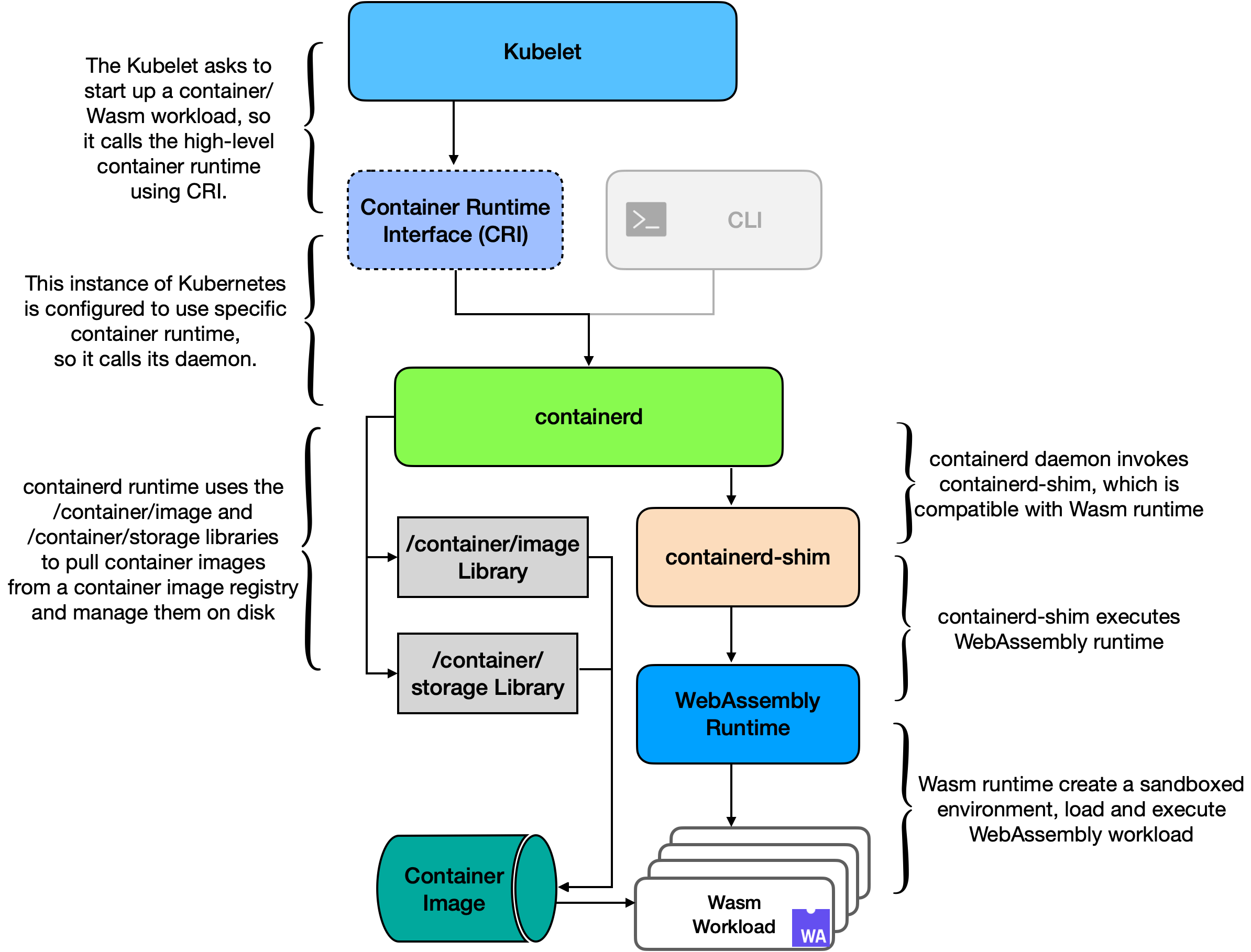
Figure 12 (from thesis): The hybrid K8s cluster architecture with one master node and two worker nodes. Worker node 1 uses CRI-O with crun and WasmEdge runtime, enabling Wasm workload execution. Worker node 2 uses containerd with Fermyon Spin and the traditional runc runtime, also supporting Wasm workloads.
Both methods enable hybrid workloads: traditional containers and Wasm modules running side-by-side in the same cluster.
Method 1: crun with WasmEdge
Overview
This method uses:
- High-level runtime: CRI-O
- Low-level runtime: crun (with native Wasm support)
- Wasm runtime: WasmEdge
- Language: Rust (compiled to Wasm)
Architecture
Figure 10 (from thesis): Worker node architecture with Kubelet, a high-level container runtime (CRI-O), crun low-level runtime, and WasmEdge WebAssembly runtime, enabling the execution of Wasm workloads within a Kubernetes cluster.
How crun Detects Wasm Workloads
The critical question: How does crun know whether to run a container or Wasm module?
The answer: Annotations in the OCI specification
When CRI-O prepares a container, it checks for a special annotation:
run.oci.handler=wasmIf this annotation is present, crun:
- Recognizes the workload as Wasm
- Invokes the Wasm handler instead of container handler
- Passes control to WasmEdge runtime
- WasmEdge creates sandbox and executes Wasm module
// Annotation flow
Container Image Metadata
    └─ run.oci.handler=wasm
        └─ CRI-O read annotation
            └─ CRI-O passes to crun
                └─ crun checks annotation
                    └─ crun invokes Wasm handler
                        └─ WasmEdge executes module
Method 1: Implementation Steps
Step 1: Development Environment Setup
Required Software:
| Component | Version | Purpose |
|---|---|---|
| Rust | 1.75.0 | Programming language |
| WasmEdge | 0.12.1 | Wasm runtime |
| Buildah | 1.32.2 | Container image builder |
# Install Rust
curl --proto '=https' --tlsv1.2 -sSf https://sh.rustup.rs | sh

# Add Wasm target
rustup target add wasm32-wasi

# Install WasmEdge
curl https://raw.githubusercontent.com/WasmEdge/WasmEdge/master/utils/install.sh -sSf | bash

# Install Buildah
sudo apt-get install buildah
Step 2: Build Wasm Workload
Project Structure:
my-wasm-service/
├── src/
│   ├── main.rs          # Entry point
│   └── lib.rs          # Library code
├── Cargo.toml          # Rust manifest
└── Dockerfile          # Container definition
Example Rust HTTP Server (main.rs):
use std::io::Write;
use std::net::TcpListener;

fn main() {
    let listener = TcpListener::bind("0.0.0.0:8080")
        .expect("Failed to bind");

    for stream in listener.incoming() {
        match stream {
            Ok(mut stream) => {
                let response = "HTTP/1.1 200 OK\r\nContent-Type: text/plain\r\n\r\nHello from Wasm!";
                stream.write_all(response.as_bytes()).ok();
            }
            Err(e) => eprintln!("Error: {}", e),
        }
    }
}
Build Command:
# Compile to Wasm
cargo build --target wasm32-wasi --release

# Binary location: target/wasm32-wasi/release/http_server.wasm

# Test locally
wasmedge ./target/wasm32-wasi/release/http_server.wasm
Step 3: Containerize and Publish
Dockerfile:
FROM scratch
COPY target/wasm32-wasi/release/http_server.wasm /http_server.wasm
ENTRYPOINT ["/http_server.wasm"]
Build and Push:
# Build container image
buildah bud -t myregistry/wasm-service:1.0 .

# Push to registry
buildah push myregistry/wasm-service:1.0
Step 4: Configure Worker Node
Install Components:
# Install WasmEdge
curl https://raw.githubusercontent.com/WasmEdge/WasmEdge/master/utils/install.sh | bash

# Build crun with WasmEdge support
git clone https://github.com/containers/crun
cd crun
./autogen.sh
./configure --with-wasmedge
make
sudo make install

# Install CRI-O
apt-get install cri-o

# Configure CRI-O to use crun
cat >> /etc/crio/crio.conf << EOF
[crio.runtime]
default_runtime = "crun"

[crio.runtime.runtimes.crun]
runtime_path = "/usr/local/bin/crun"
EOF

# Restart CRI-O
systemctl restart cri-o
Step 5: Deploy to Kubernetes
Label node for Wasm:
kubectl label nodes worker1 wasmedge=trueKubernetes Manifest (wasmedge-deployment.yaml):
apiVersion: apps/v1
kind: Deployment
metadata:
  name: wasm-http-service
spec:
  replicas: 3
  selector:
    matchLabels:
      app: wasm-service
  template:
    metadata:
      labels:
        app: wasm-service
      annotations:
        run.oci.handler: wasm
    spec:
      nodeSelector:
        wasmedge: "true"
      containers:
      - name: wasm-app
        image: myregistry/wasm-service:1.0
        ports:
        - containerPort: 8080
        resources:
          requests:
            memory: "32Mi"
            cpu: "50m"
          limits:
            memory: "64Mi"
            cpu: "200m"
---
apiVersion: v1
kind: Service
metadata:
  name: wasm-service
spec:
  type: NodePort
  ports:
  - port: 8080
    targetPort: 8080
    nodePort: 31001
  selector:
    app: wasm-service
Deploy and Verify:
# Deploy
kubectl apply -f wasmedge-deployment.yaml

# Check deployment
kubectl get deployment
# Output:
# NAME                 READY   UP-TO-DATE   AVAILABLE
# wasm-http-service    3/3     3            3

# Test the service
curl http://localhost:31001
# Output: Hello from Wasm!
Method 2: containerd with Fermyon Spin and containerd-shim
Overview
This method uses:
- High-level runtime: containerd
- Low-level runtime: runc (for containers) or containerd-shim (for Wasm)
- Wasm runtime: Fermyon Spin
- Language: Rust (with Spin framework)
- Shim source: Microsoft’s Deislabs runwasi project
Architecture
┌────────────────────────────────────┐
│ Kubernetes (Kubelet) │
├────────────────────────────────────┤
### Method 2: containerd + Fermyon Spin Architecture
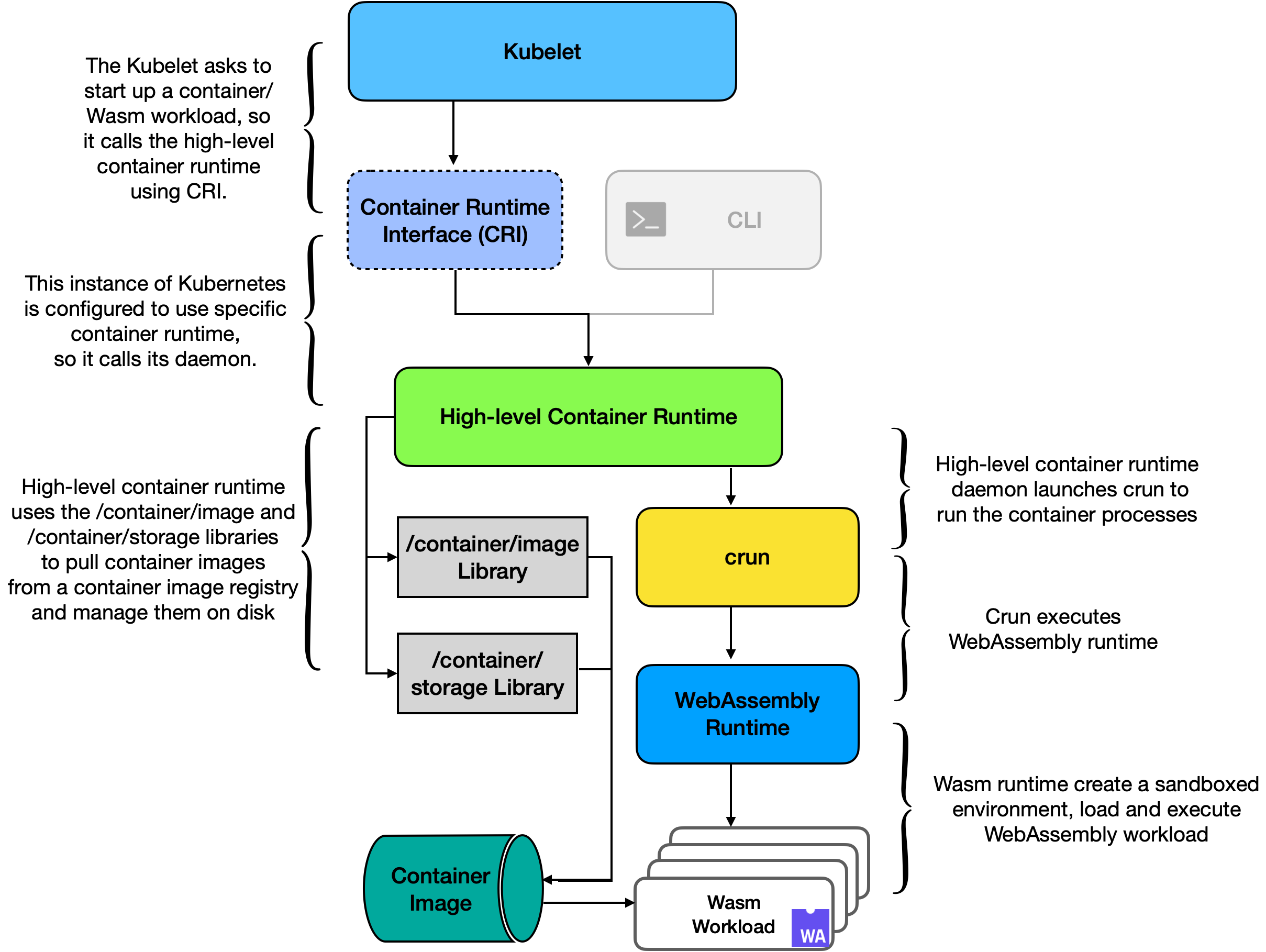
**Figure 11 (from thesis):** Worker node architecture with Kubelet, containerd, containerd-shim, and the Fermyon Spin WebAssembly runtime, enabling the execution of Wasm workloads within a Kubernetes cluster.
### How containerd Uses Runtime Classes
Unlike crun's annotation approach, containerd uses **Kubernetes RuntimeClass**:
```yaml
apiVersion: node.k8s.io/v1
kind: RuntimeClass
metadata:
name: wasmtime
handler: wasmtime # Maps to handler in containerd configHow it works:
- Pod specification references RuntimeClass
- Kubelet queries containerd for handler “wasmtime”
- containerd configuration maps handler to specific shim
- containerd invokes containerd-shim-wasmtime-v1
- Shim manages Wasm runtime and module execution
Method 2: Implementation Steps
Step 1: Development Environment Setup
Required Software:
| Component | Version | Purpose |
|---|---|---|
| Rust | 1.75.0 | Programming language |
| Spin | 2.0+ | Wasm framework |
| Buildah | 1.32.2 | Container image builder |
# Install Spin
curl https://developer.fermyon.com/downloads/install.sh | bash

# Install Rust (if not already done)
rustup target add wasm32-wasi
Step 2: Build Wasm Application with Spin
Initialize Spin Project:
spin new http-rust my-spin-app --accept-defaults
cd my-spin-app
Project Structure:
my-spin-app/
├── src/
│   └── lib.rs         # Request handler
├── spin.toml          # Spin configuration
└── Cargo.toml         # Cargo manifest
Example Handler (src/lib.rs):
use spin_sdk::http::{Request, Response};
use spin_sdk::http_component;

#[http_component]
fn handle_request(req: Request) -> Response {
    Response::builder()
        .status(200)
        .header("content-type", "text/plain")
        .body("Hello from Spin!")
        .build()
}
Build Spin Application:
# Build the Spin application
spin build

# Output location: target/wasm32-wasi/release/spin_compatible_module.wasm
Step 3: Containerize with Custom Handler
Dockerfile for Spin:
FROM scratch
COPY target/wasm32-wasi/release/spin_compatible_module.wasm /app.wasm
ENTRYPOINT ["/app.wasm"]
Build and Push:
buildah bud -t myregistry/wasm-spin-service:1.0 .
buildah push myregistry/wasm-spin-service:1.0
Step 4: Configure Worker Node 2
Install containerd with Wasm support:
# Install containerd
apt-get install containerd.io

# Clone runwasi for containerd-shim
git clone https://github.com/deislabs/containerd-wasm-shims
cd containerd-wasm-shims

# Build shim for Fermyon Spin
cd containerd-shim-spin-v1
cargo build --release

# Install shim
sudo cp target/release/containerd-shim-spin-v1 /usr/local/bin/containerd-shim-spin-v1
sudo chmod +x /usr/local/bin/containerd-shim-spin-v1
Configure containerd for Wasm:
cat >> /etc/containerd/config.toml << EOF
[plugins."io.containerd.grpc.v1.cri".containerd.runtimes.spin]
  runtime_engine = "/usr/local/bin/containerd-shim-spin-v1"
  runtime_root = ""
  runtime_type = "io.containerd.runc.v2"
EOF

systemctl restart containerd
Step 5: Create Kubernetes RuntimeClass
RuntimeClass Definition (spin-runtime-class.yaml):
apiVersion: node.k8s.io/v1
kind: RuntimeClass
metadata:
  name: spin
handler: spin  # Must match handler in containerd config
Apply RuntimeClass:
kubectl apply -f spin-runtime-class.yamlStep 6: Deploy to Kubernetes
Label node:
kubectl label nodes worker2 spin=trueKubernetes Manifest:
apiVersion: apps/v1
kind: Deployment
metadata:
  name: wasm-spin-service
spec:
  replicas: 3
  selector:
    matchLabels:
      app: wasm-spin-app
  template:
    metadata:
      labels:
        app: wasm-spin-app
    spec:
      runtimeClassName: spin
      nodeSelector:
        spin: "true"
      containers:
      - name: spin-app
        image: myregistry/wasm-spin-service:1.0
        ports:
        - containerPort: 8080
        resources:
          requests:
            memory: "32Mi"
            cpu: "50m"
          limits:
            memory: "64Mi"
            cpu: "200m"
---
apiVersion: v1
kind: Service
metadata:
  name: wasm-spin-service
spec:
  type: NodePort
  ports:
  - port: 8080
    targetPort: 8080
    nodePort: 31002
  selector:
    app: wasm-spin-app
Deploy and verify:
kubectl apply -f spin-deployment.yaml
kubectl get deployment
curl http://localhost:31002
# Output: Hello from Spin!
Comparative Analysis
Method 1: crun + WasmEdge
Advantages:
- ✅ Simpler architecture (direct runtime invocation)
- ✅ Works with CRI-O (familiar to OCI enthusiasts)
- ✅ Annotations in image metadata (no extra K8s objects)
- ✅ Direct control over runtime behavior
Challenges:
- ⚠️ Requires building crun from source with Wasm support
- ⚠️ Less mature Wasm support in crun
- ⚠️ Annotation-based dispatch less discoverable
- ⚠️ No lifecycle management between shim and runtime
Method 2: containerd + Fermyon Spin
Advantages:
- ✅ Uses industry-standard containerd
- ✅ RuntimeClass provides explicit Wasm configuration
- ✅ containerd-shim handles lifecycle properly
- ✅ Better for mixed container/Wasm deployments
- ✅ Fermyon Spin framework morefeature-rich
Challenges:
- ⚠️ More complex architecture (multiple layers)
- ⚠️ Requires custom containerd-shim development
- ⚠️ Additional RuntimeClass object needed
- ⚠️ More moving parts to configure
Hybrid Kubernetes Cluster
Many organizations deploy both methods in a single cluster:
Master Node (Control Plane)
    ├─ API Server
    ├─ Scheduler
    ├─ Controller Manager
    └─ etcd

Worker Node 1 (CRI-O + crun + WasmEdge)
└─ Wasm workloads using Method 1

Worker Node 2 (containerd + Spin shim)
├─ Traditional containers (runc)
└─ Wasm workloads using Method 2

Worker Node 3 (standard containerd)
└─ Traditional containers only
This hybrid approach provides:
- Flexibility: Support multiple workload types
- Gradual migration: Coexist with traditional containers
- Optimization: Use best tool for each workload
- Risk mitigation: Not fully committed to one approach
Performance Comparison
Startup Time
Traditional Container:      ~2-5 seconds
Method 1 (crun + WasmEdge): ~100-500 ms
Method 2 (Spin + shim):     ~200-800 ms
Memory Per Instance
Traditional Container:      100-200 MB
Method 1 (crun + WasmEdge): 10-30 MB
Method 2 (Spin + shim):     15-40 MB
Throughput (ops/sec)
Method 1 and Method 2 offer comparable throughput to native code,
with ~95-99% of native speed for CPU-bound workloads.
Conclusion
Both methods represent viable approaches to running WebAssembly workloads on Kubernetes, each with distinct architectural philosophies:
- Method 1 (crun + WasmEdge): Simpler but emerging
- Method 2 (containerd + Spin): More complex but battle-tested
The choice depends on your organization’s:
- Infrastructure maturity (containerd is more standard)
- Development preferences (Spin framework vs. bare Wasm)
- Performance requirements (both are excellent)
- Operational comfort (RuntimeClass vs. annotations)
Neither method is “better”—they represent different trade-offs optimized for different scenarios. As the Wasm ecosystem matures, both approaches will likely converge toward standardized, simplified configurations.
The key insight is that Kubernetes’ modularity makes it possible to run Wasm workloads efficiently without sacrificing container support. This hybrid approach represents the future of cloud-native computing: containers for traditional workloads, Wasm for high-performance, resource-constrained scenarios.
Ready to implement one of these methods? Both are production-ready and offer a path to significant performance and efficiency improvements in your Kubernetes infrastructure!
References
Based on “Exploring WebAssembly-Based Microservices Implementation & Deployment Methods in Kubernetes” by Micheal Choudhary (2024):
[28] “kube-controller-manager,” [Online]. Available: https://kubernetes.io/docs/reference/command-line-tools-reference/kube-controller-manager/. [Accessed 04 May 2023].
[29] “Controller,” [Online]. Available: https://kubernetes.io/docs/concepts/architecture/controller/. [Accessed 02 May 2023].
[30] “kubelet,” [Online]. Available: https://kubernetes.io/docs/reference/command-line-tools-reference/kubelet/. [Accessed 6 August 2023].
[39] D. Gohman , “WASI: WebAssembly System Interface,” [Online]. Available: https://github.com/bytecodealliance/wasmtime/blob/main/docs/WASI-overview.md. [Accessed 14 May 2023].
[40] “WasmEdge Developer Guides,” [Online]. Available: https://wasmedge.org/docs. [Accessed 18 August 2023].
[41] “Fermyon Spin Developer Guide,” [Online]. Available: https://developer.fermyon.com/spin/index/. [Accessed 16 May 2023].
[42] “crun “User Commands”,” [Online]. Available: https://github.com/containers/crun/blob/main/crun.1.md. [Accessed 23 August 2023].
[43] “containerd/runwasi Facilitate running Wasm/ WASI workloads managed by containerd,” [Online]. Available: https://github.com/containerd/runwasi. [Accessed 29 July 2023].
[44] “deislab/containerd-wasm-shims: Containerd shims for running WebAssembly workloads in Kubernetes,” [Online]. Available: https://github.com/deislabs/containerd-wasm-shims. [Accessed 30 July 2023].
[45] “Buildah Installation Guide.,” [Online]. Available: https://github.com/containers/buildah/blob/main/install.md. [Accessed 13 February 2024].
[46] “Rust Installation Guide.,” [Online]. Available: https://www.rust-lang.org/tools/install. [Accessed 13 February 2024].
[47] “Running wasi workload natively on kubernetes using crun,” [Online]. Available: https://github.com/containers/crun/blob/main/docs/wasm-wasi-on-kubernetes.md. [Accessed 15 August 2023].
[48] “WasmEdge Installation Guide.,” [Online]. Available: https://wasmedge.org/docs/start/install. [Accessed 13 February 2024].
[49] “WasmEdge Documentation: Deploy with crun,” [Online]. Available: https://wasmedge.org/docs/develop/deploy/oci-runtime/crun. [Accessed 14 February 2024].
[50] “CRI-O - OCI-based implementation of Kubernetes Container Runtime Interface,” [Online]. Available: https://github.com/cri-o/cri-o. [Accessed 14 February 2024].
[51] “Installing kubeadm,” [Online]. Available: https://kubernetes.io/docs/setup/production-environment/tools/kubeadm/install-kubeadm/. [Accessed 12 December 2023].
[52] “containerd: Getting started with containerd,” [Online]. Available: https://github.com/containerd/containerd/blob/main/docs/getting-started.md. [Accessed 24 February 2024].
[53] “About the Open Container Initiative,” [Online]. Available: https://opencontainers.org. [Accessed 3 May 2023].
[54] S. Hykes, “Introducing runC: a lightweight universal container runtime,” [Online]. Available: https://www.docker.com/blog/runc/. [Accessed 6 August 2023].
[55] “Redhat: What is a container registry?,” [Online]. Available: https://www.redhat.com/en/topics/cloud-native-apps/what-is-a-container-registry. [Accessed 17 July 2023].
[56] “Rust: The Manifest Format,” [Online]. Available: https://doc.rust-lang.org/cargo/reference/manifest.html. [Accessed 17 August 2023].
[57] D. Uszkay, “How Shopify Uses WebAssembly Outside of the Browser,” 18 December 2020. [Online]. Available: https://shopify.engineering/shopify-webassembly. [Accessed 18 January 2024].
[58] “WASI proposals,” [Online]. Available: https://github.com/WebAssembly/WASI/blob/main/Proposals.md. [Accessed 15 May 2023].
[59] “WebAssembly/wasi-libc: WASI libc implementation for WebAssembly,” [Online]. Available: https://github.com/WebAssembly/wasi-libc. [Accessed 26 February 2024].
[60] M. Yuan, “WasmEdge/wasmedge_hyper_demo,” March 2023. [Online]. Available: https://github.com/WasmEdge/wasmedge_hyper_demo/blob/cd62f395db79d899e185bf1093fedc3068a843a7/server/src/main.rs. [Accessed 15 September 2023].
[61] “musec/libpreopen: Library for wrapping libc functions that require ambient authority,” [Online]. Available: https://github.com/musec/libpreopen. [Accessed 12 February 2024].
[62] “Open Container Initiative,” [Online]. Available: https://opencontainers.org/. [Accessed 23 November 2023].